Tilisi Developments
LimuruTilisi Developments
Project Shimba
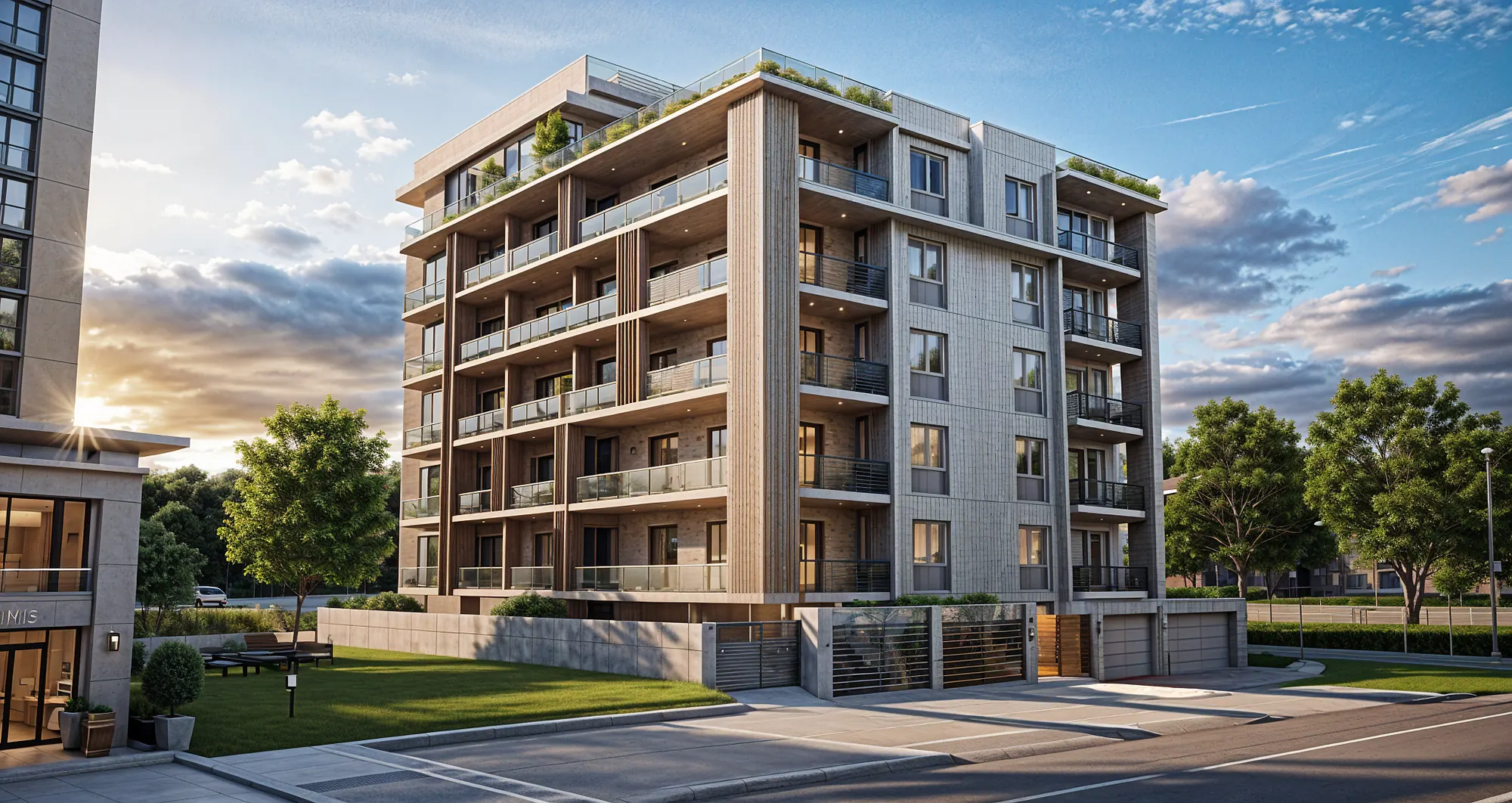
23-house cluster
Every home scanned in 360° through construction, with progress shared to the client team.
Visualize
Construction intelligence for developers
SiteSeer connects visual site evidence with your project records, so you can see what is happening, what is behind and who needs to act. Use your next project review as the starting point.
Every tool · every stakeholder · one place
Everything comes into one place. Every answer, traced to evidence.
What is happening?
64%planned 66% · verified on site
What is stuck?
What is at risk?
Who needs to act?
What do you need from me?
Waiting on you · 12today
Working with
 AR EngineeringKelani EstatesAR EngineeringKelani EstatesAR EngineeringKelani Estates
The problem
A site visit. Ten people to talk to. Five more to email. A programme updated by hand that is stale by the time it is shared, and documents that live in WhatsApp groups and inboxes.
Every party is working. When one of them is late, everyone behind them waits, and you are the one who has to find out.
Two hours on site. Level 3 looks behind, but nobody can say by how much, or why.
The contractor, the PM, the site agent, the QS… three versions of the same week.
To the architect, the engineer and two suppliers for the rest. Two reply.
The revised drawing was sent. It is somewhere in the site WhatsApp group, 400 messages up.
Someone updates the programme by hand. It is out of date before the meeting starts.
An approval sits with one reviewer. Everything behind it, the order, the pour, the payment, waits.
You walk in with a position you cannot fully back up, and the decision is due today.
The challenge is not simply collecting more project information.It is getting to a reliable project position in time to make the right decision.
What if everything came to your fingertips?
What the site shows and what the records say, in one place. Sera reads both, so you can ask a question in plain words, see the evidence behind the answer in a second, and act on it on the web, on your phone, on WhatsApp or by email.
Visual · what the site shows
01 · See what is happening on site
Visual records, 360° captures, timelines and observations, each pinned to a place on the plan and a date. See this week, last week and the week before, from anywhere.
Visualize · see your site
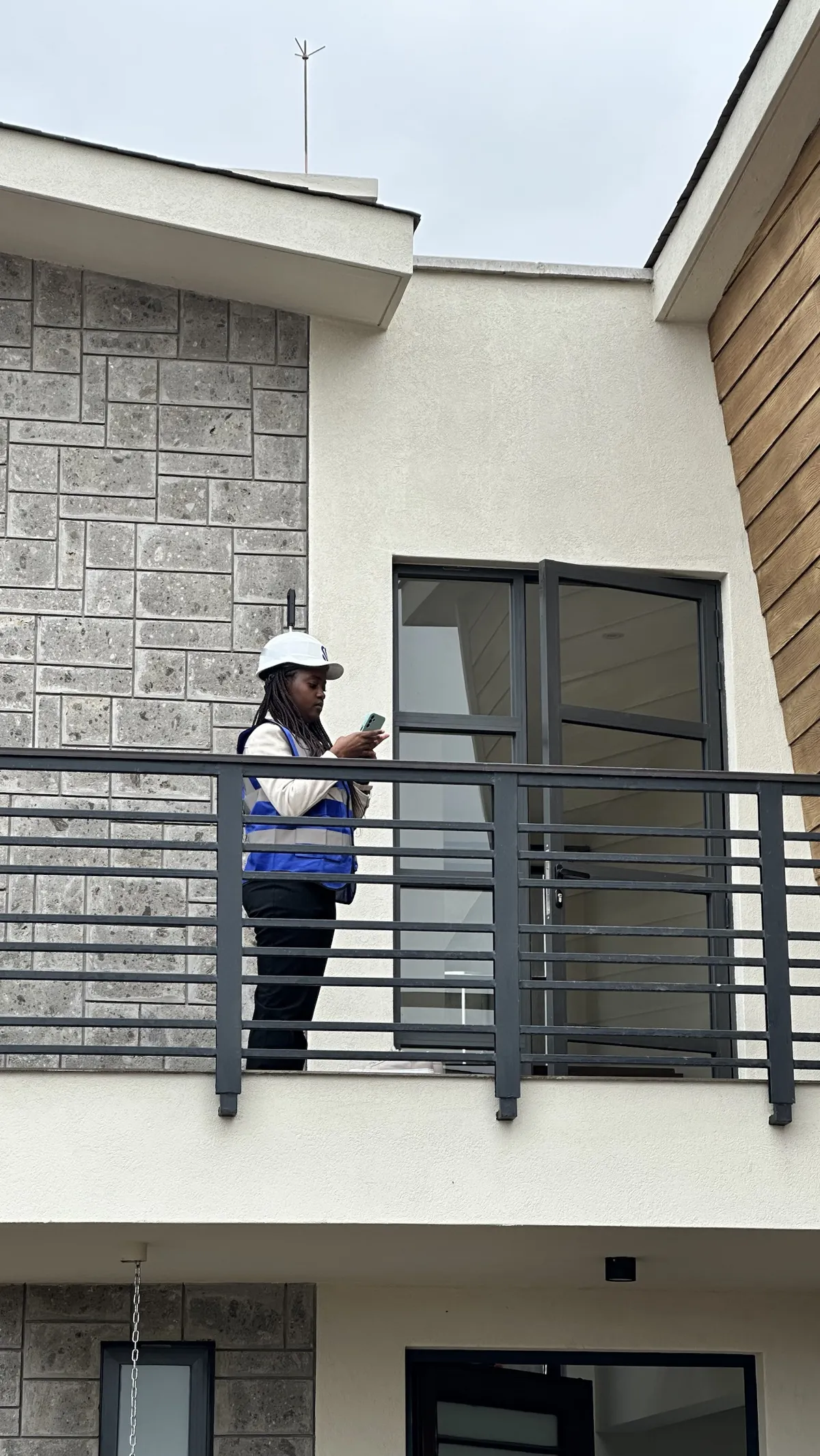
Our team walks every floor with a 360° camera each week. Every capture lands on the plan with its date, so a snag on your phone can be checked against this week, last week and the week before in seconds.
Tap a hotspot on the floor plan and the 360° panorama of that spot opens over it, with the date, the room and who captured it.
Hotspot to 360° panorama
The same spot on two dates, side by side: what went in, what is behind the wall, and when.
Before and after on two dates
Every capture of one spot played in order, week by week, so anyone can see how the building went up.
Week-by-week timelapse of one spot
The first capture of a spot beside the latest one: ground, slab, walls, services and finishes, each on its date.
The same spot, first and latest capture
Turn the building, pick a floor and look at the capture from the same angle as the model: what was planned and what is there.
Twin view from another angle
Observations and snags
Observations raised on site land on the same plan as the captures, so the defect, the photo, the owner and the closing evidence stay together until handover.
Snagging and quality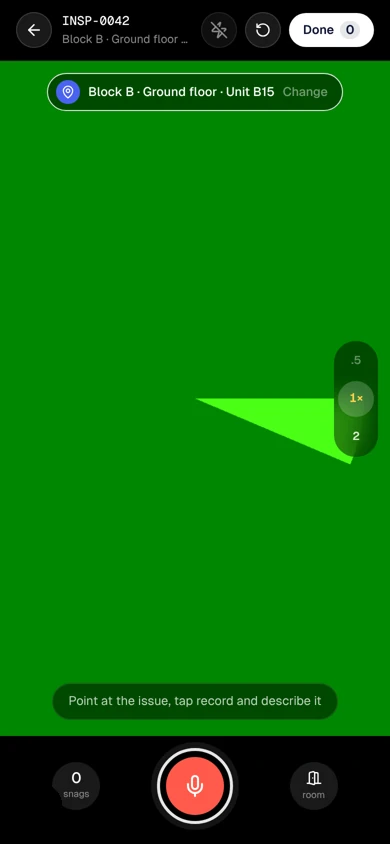
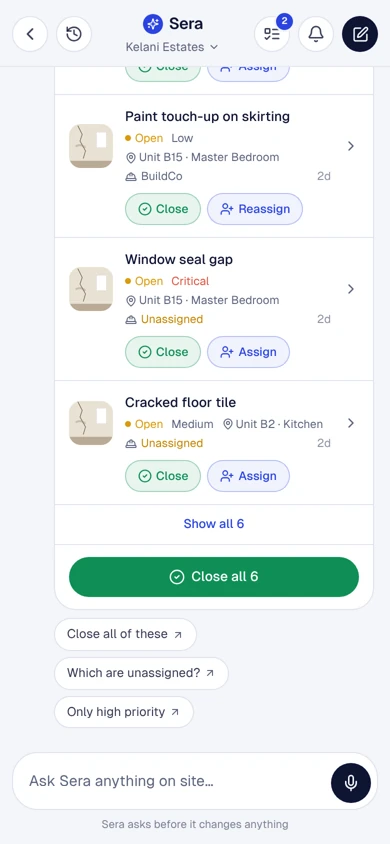
Ask questions, trace the evidence · Sera AI
Sera reads the captures and every record on the project. Each answer links to the capture or record it came from, and where there is no evidence yet, it says so.
What changed on Block B since last week?
Traced to 2 sources in 0.8 s
The evidence
Chat with your project · 01 · Snags
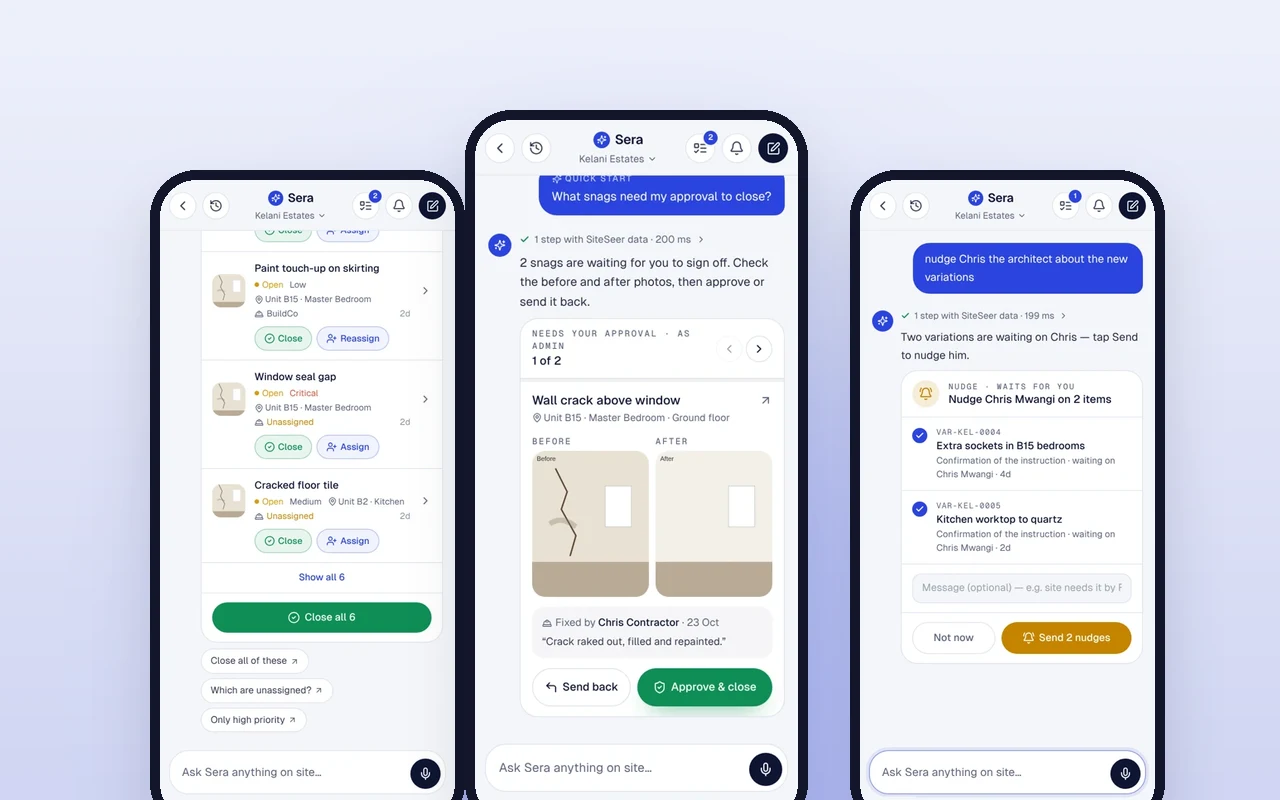
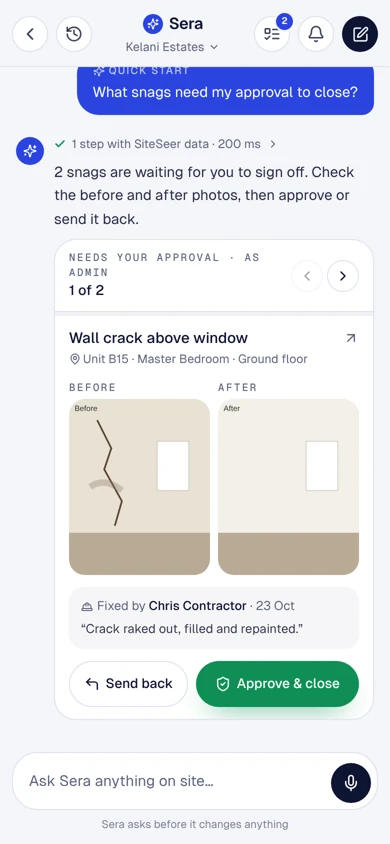
Sera lists what is waiting on you, with the before and after photos. Approve and close, or send it back, without opening a laptop.
Chat with your project · 02 · Procure
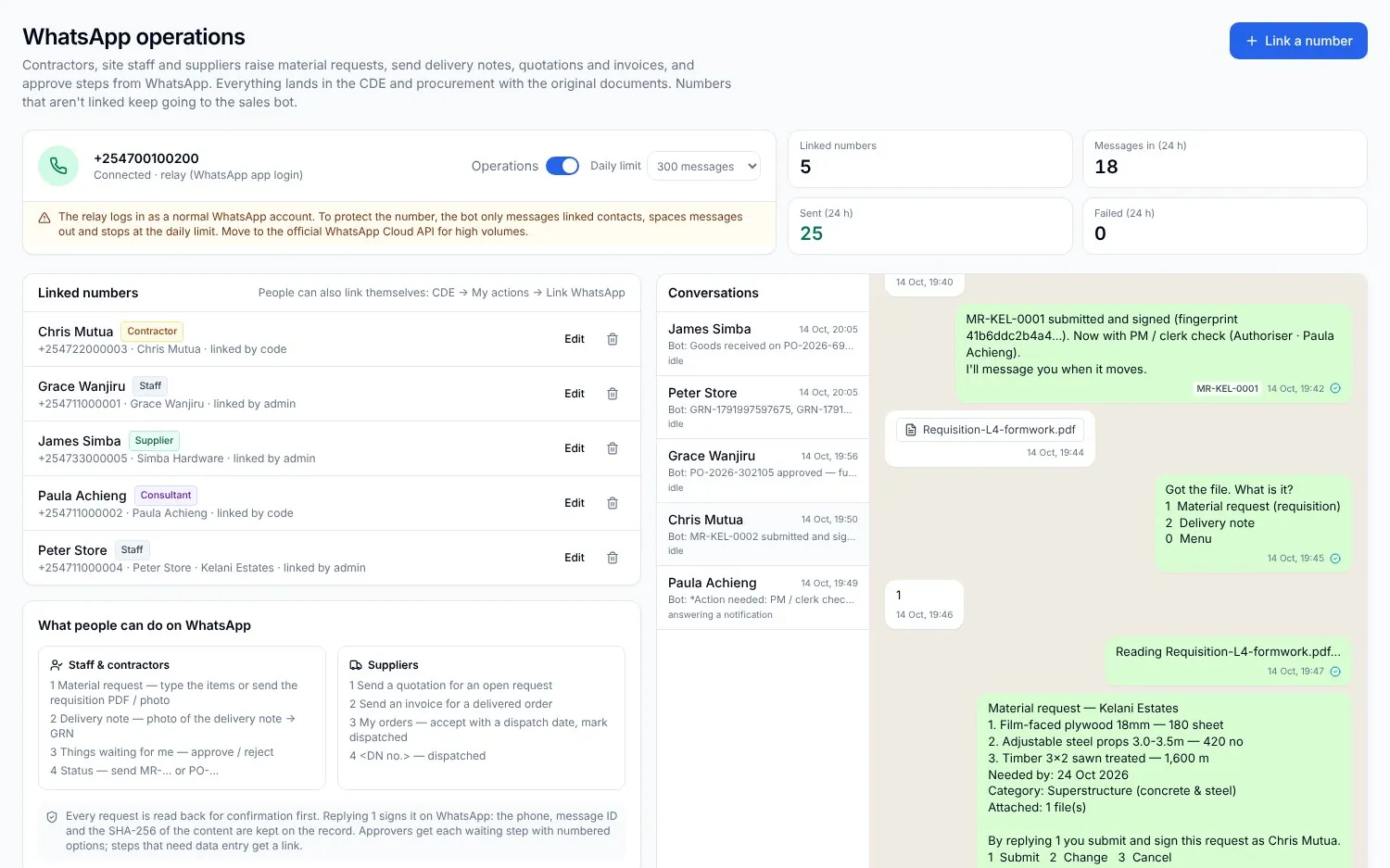
A message or a voice note becomes a signed material request, matched to the BOQ and sent into your procurement flow.
Chat with your project · 03 · Prices
Quotes side by side with delivery dates, the spec and the market range, then sent to whoever can approve that amount.
Chat with your project · 04 · Team
To-dos for your architects, contractors and suppliers go out on WhatsApp and email, and come back to you when they are done.
Chat with your project · 05 · Follow up
Ask what is late and who holds it. One tap nudges everyone on the list, with the items attached.
Chat with your project · 06 · Progress
Programme and progress from the site record, and the report your bank asked for, sent from the same chat.
Sample data · Kelani Estates
1 step with SiteSeer data · 200 ms
2 snags are waiting for you to sign off. Check the before and after photos, then approve or send it back.
Wall crack above window
Unit B15 · Master Bedroom · Ground floor
Closed SN-0142. Chris Contractor was told on WhatsApp, and it moves to closed in the snag report.
2 steps with SiteSeer data · 340 ms
Matched to BOQ 3.4 and 4.2, within budget. Sign it and I'll send it into procurement.
MR-KEL-0012 is in procurement. Paula (PM) checks the quantities next.
3 steps with SiteSeer data · 410 ms
Three quotes are in. Only Kilele Steel meets Thursday and the spec.
Within budget. KSh 145,000 goes to Paula (PM) — she can approve up to KSh 250,000.
1 step with SiteSeer data · 201 ms
Check who it goes to and tap Send.
WhatsApp EmailTracked in To-dos · Sent by me
4 steps with SiteSeer data · 520 ms
Nine things are past their due date. Two variations are waiting on Chris — tap Send to nudge him.
3 steps with SiteSeer data · 640 ms
Block B is 64% complete, 2% behind the programme. Level 4 blockwork is the one to watch.
Sera asks before it changes anything
3 items, needed by Friday 30 Oct. It goes to the PM / clerk of works to check the quantities first.
Requested by (type your name to sign)
I confirm this request and sign it electronically.
Integrations
Email, schedules, trackers, drawings, models and payments come into SiteSeer by import, sync or a forwarded message. Nobody has to change how they work.
Names are trademarks of their owners. Ask us about the tools on your project.
Connect progress to project controls
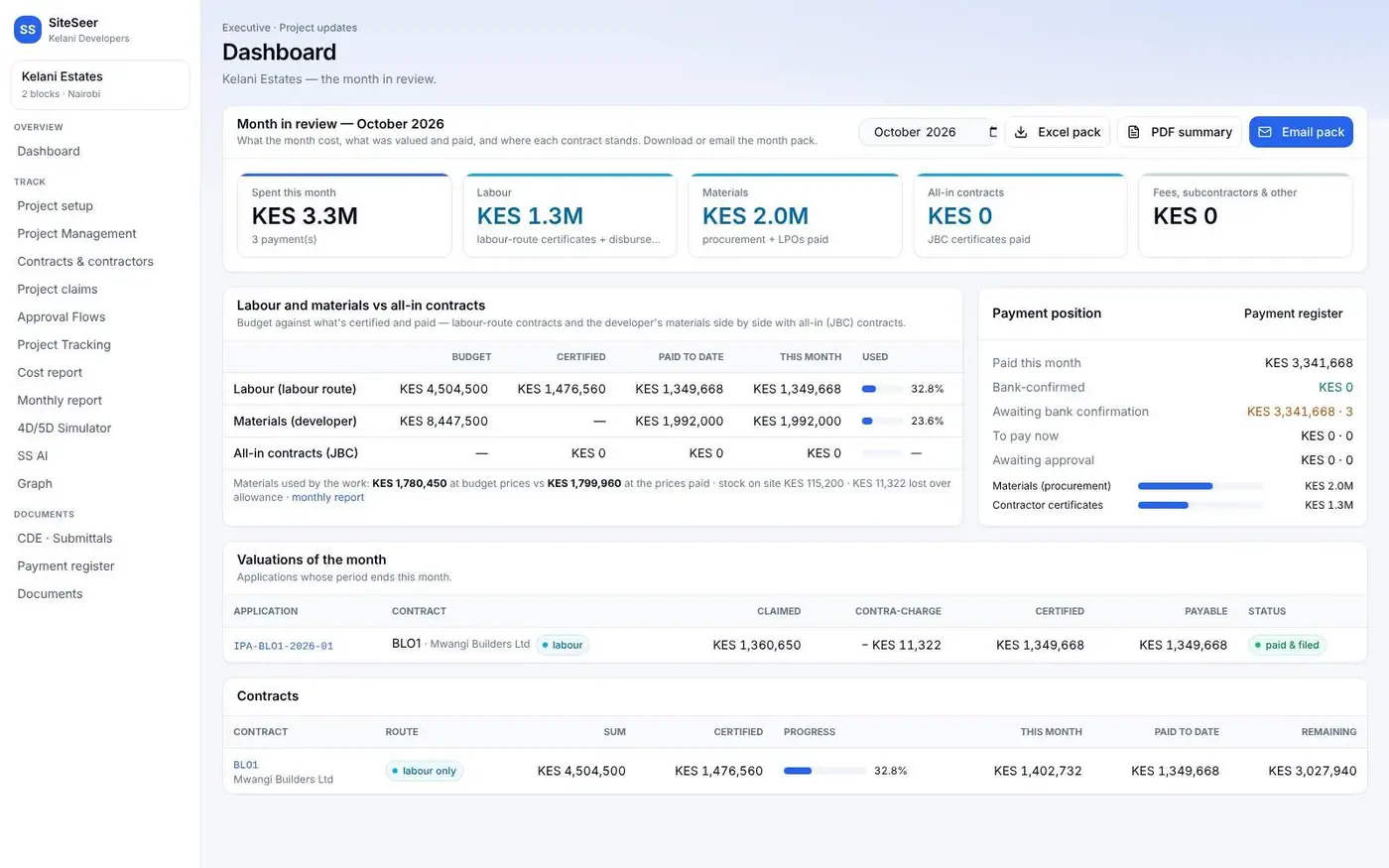
What the site shows is matched to the programme, the BOQ, procurement, invoices and payments, the documents and the model, so a slip, an overclaim or a stuck approval shows up with its evidence.
Programme and progress · the canvas
Where it is. What is late. Checked against the programme, every week.
The whole project on one canvas: every area coloured by verified progress against the programme — on time, behind or not started.
The project canvas against the programme
Before and after on the canvas: what moved since last week's capture, highlighted, so nobody has to ask.
This week against last week
Click a unit or area that is behind: its activities, the dates the programme set, and what the last capture showed.
Opening a unit that is behind
Each wall, slab and room on the floor-plan canvas is an element. Click it for its progress, its photos and the activity it belongs to.
An element's progress on the floor plan
Turn on the risk layer to see where the delays, open snags and lines at risk sit on the plan.
The risk layer on the canvas
Move along the timeline on the 2D canvas and watch the progress build, week to week or month to month.
Tracking on the 2D canvas over time
Programme · how it works
Load your MS Project or Primavera P6 programme once. Verified progress from every site walk is laid over it, slips are flagged in the week they start, and each contractor update is checked before it is accepted. No Gantt chart going stale in an inbox.
01 / 04
Your programme loaded as a Gantt chart: every activity with its dates, links, the critical path and the milestones.
Cost and commercial
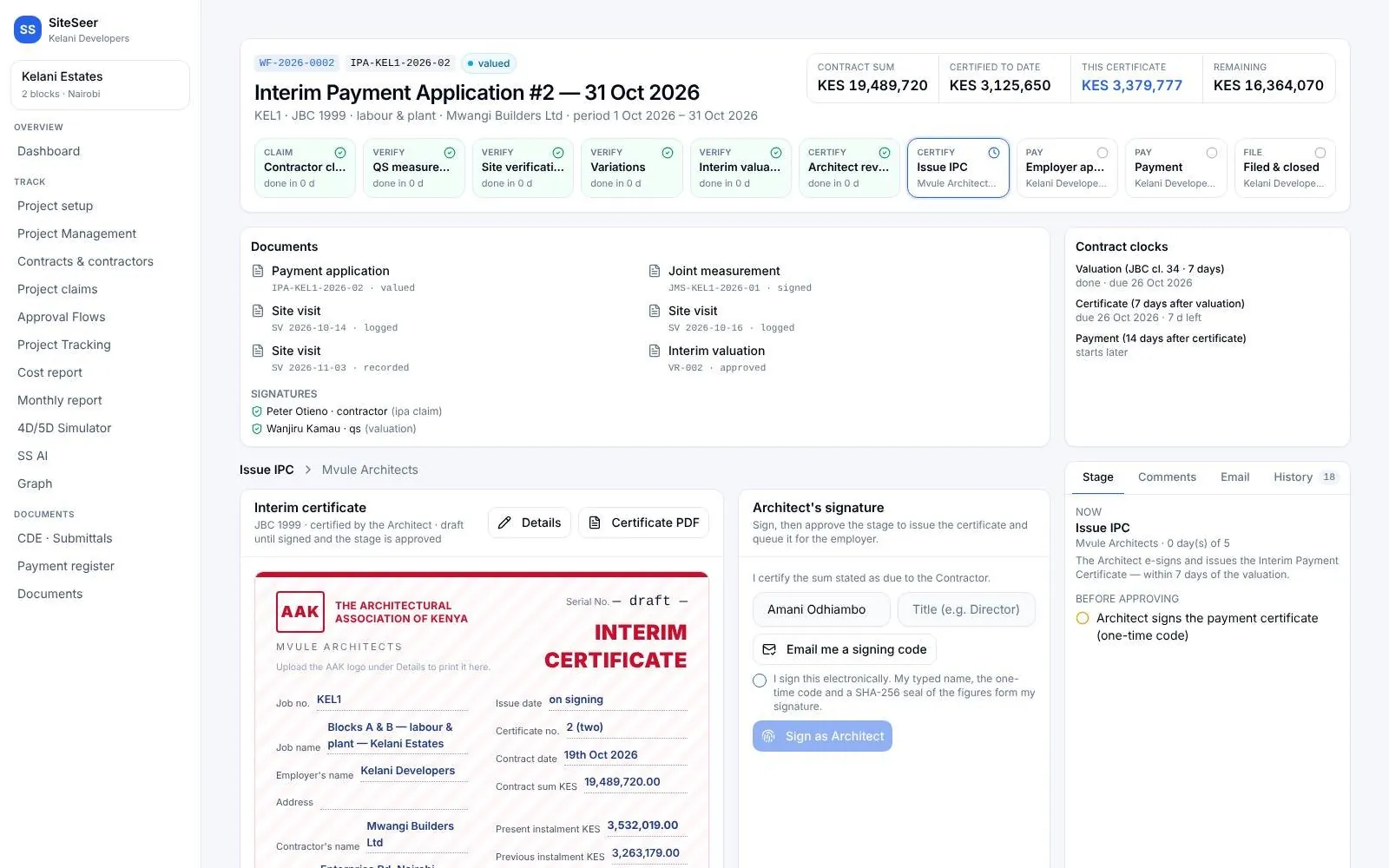
BOQ, procurement, invoices, payments and IPC. Each figure traced to the record behind it.
Documents and coordination
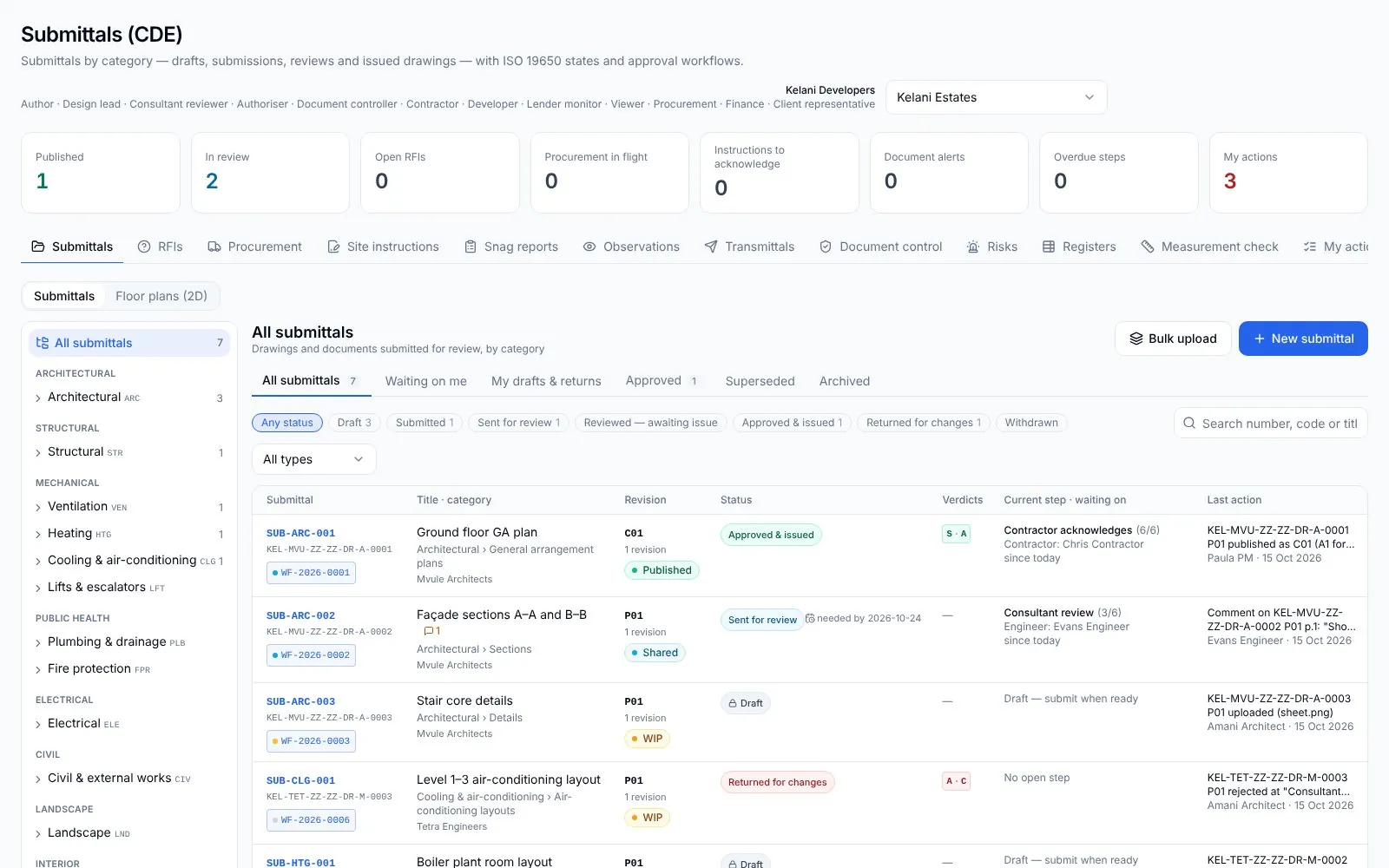
Correspondence, submittals, RFIs and variations. On one register, with who holds each one.
BIM and the CDE
One model, linked to the work. Spec, programme, cost and progress on every element.
01 / 06
IFC models open in the browser, linked to the project: by zone and floor, no licences.
Risks and outstanding actions
What could hold the project up. With an owner, a date and what it affects.
Turn information into action
Assign the work, send the follow-ups and move approvals through their workflow from the same place you asked the question. Nothing changes until a person taps, and everything is kept.
A question, a snag or a meeting point becomes an action with an owner and a date, from the web, the phone or a chat.
TD-0311 · to Chris Mwangi, Fri
Reminders and nudges go out on WhatsApp and email with the item attached, until it is done. Nobody chases from memory.
2 nudges · VAR-KEL-0004, 0005
Requests, variations, submittals and payments move through their approval workflow, step by step, with who holds each one.
MR-KEL-0012 · step 3 of 6
Every action is saved to the record with who did it, when and from where, so the next answer starts from evidence.
Logged 10:58 · web platform
Back to the main platform
Sera works on the same data as the platform. What you approve, send or sign on the phone is saved there, with who did it and when, so your team sees it on the web and you can trace it later.
Done in Sera today
Sample data. Each row opens the record it changed.
Every tap writes to the same record as the web platform: what changed, who did it, when, and from which device.
Open any action on the platform: the snag with its photos, the order with its quotes, the to-do with its replies.
Sign-offs keep the typed name and the version they were given on. Audits and disputes start from evidence, not chat history.
One assistant, four doors. Type, talk or send a photo. Same permissions everywhere: each person only sees what they are allowed to.
When it matters
SiteSeer is most useful at the moments a decision is due and the position has to be right: the review, the payment, the slip, the report.
“What has really moved since the last meeting?”
“Is the work being claimed actually on site?”
“What is driving the delay, and what does it push?”
 04 · When management needs an update
“Where do we stand, on one page?”
SiteSeer does not replace the Engineer's, the Architect's or the Quantity Surveyor's certification. It gives the people responsible for those decisions the evidence, the records and the open questions in one place, so they can make them sooner.
On site today
KES 6B+
Helping manage more than KES 6 billion worth of projects. Every engagement starts with the same thing: a verified record of what is on site.
Tilisi Developments
23-house cluster
Every home scanned in 360° through construction, with progress shared to the client team.
Centum Real Estate
Pilot project
Piloting SiteSeer's verified site record with Centum Real Estate on Cascadia.
Luxury apartments
Residential apartments
A luxury apartment development in Westlands, Nairobi, run on SiteSeer.
And many more.
Clusters, apartments and mixed-use projects across Kenya.
See the projectsYour project
Working with
AR EngineeringKelani EstatesAR EngineeringKelani EstatesAR EngineeringKelani EstatesHow SiteSeer works
BOQ, programme, drawings, contracts and the trackers you already keep. Excel, PDF, Primavera P6 (XER) or a Procore import.
Our team captures every floor in 360° each week, pinned to your plans and programme, wherever in the world you are building.
Progress, documents, approvals, orders and payments are matched, so what is stuck or at risk shows up with an owner and a date.
Follow-ups, approvals, nudges and reports on the web, on your phone, on WhatsApp and by email. Every action saved on the record.
Everyone keeps their professional responsibilities. SiteSeer keeps the work between them connected.
Every part of SiteSeer
The intelligence
Sera AI by SiteSeer. Reads everything, acts with you.
Visual · on site
What the site shows. Walked, captured, verified.
Visualize
We walk your site with 360° cameras every week. Compare any two dates, from anywhere.
Visualize
Verified progress against the plan and the programme, floor by floor, week by week.
Visualize
The capture beside the model. Know what was installed behind every wall, long after handover.
Visualize
Every snag pinned to the room, owned by a contractor and closed with evidence.
Data · project controls
What the records say. Programme, BIM, orders, documents and money.
Track
Your programme as a Gantt, with verified progress on every bar and each contractor update checked against the site.
Track
IFC models in the browser, linked to the programme, the cost and the site walks. Issues go straight to the CDE.
Track
Requests, quotes, approvals and deliveries from the chat, matched to the BOQ and the budget.
Track
Drawings, submittals, RFIs and variations in one register, each with its approval flow.
Track
BOQ, procurement, invoices, claims, IPCs and payments on one record. Pay for what was built.
Questions
Something else on your mind? Walk through it with us on your own project.
It is one place where everything about a construction project comes together — what is physically on site, the programme, documents, approvals, procurement, payments and messages — so you can establish the real position of the project, with the evidence, and act on it. SiteSeer does this for real estate developers and their project teams.
Real estate developers and the teams they work with: project managers, architects, engineers, quantity surveyors, contractors and suppliers. It is built for developers who are accountable for the whole project but rely on many outside parties to deliver it.
Our team walks your site with 360° cameras every week. The captures are pinned to your floor plans and programme, so progress is measured from the site rather than reported from memory, and any two dates can be compared.
Yes. Your MS Project, Primavera P6 or Excel programme, BOQ and contracts are loaded first. Verified progress is laid over the programme, each contractor update is checked against the site, and Track runs procurement, approvals, variations, claims and payments against the BOQ, showing where the programme or budget is at risk. IFC models add 4D and 5D on the element.
Every answer from Sera links to the capture or record it came from: the site walk, the programme update, the claim, the approval. Where there is no evidence yet, for example an area that has not been captured since a date, it says so, so the gap can be closed before a decision is made.
Sera is the AI assistant across SiteSeer. It reads the project record and turns it into actions: closing snags, signing material requests, comparing quotes, sending to-dos and nudges, and producing reports. It works on the web, on your phone, on WhatsApp and by email, and nothing changes until a person taps.
No. Each party gets its own portal, and requests, approvals and deliveries also work on WhatsApp and email. Their actions land on the same record you see.
No. Everyone keeps their professional responsibilities. SiteSeer makes sure the handoffs between them are visible, owned and followed up, so you are not the one holding the project together by phone.
SiteSeer is built in Nairobi and runs projects in Kenya today. Because the site record is captured and shared online, developers and their partners can follow a project from anywhere.